Every working hour,allocated by 18:00
The working day, from overview to payroll
Four jobs, one record of time
See where the day went, per person and per project
- Windows agent, silent or with a tray iconApps, sites and files, idle and breaks. Deployed with one MSI through Intune, GPO or SCCM.
- Screenshots on Business, screen video on EnterpriseBlur, exclusions and 30-day retention included; keep up to 5 years as an add-on.
- Project activity heatmapDay, week, month and year views of hours logged on every project.
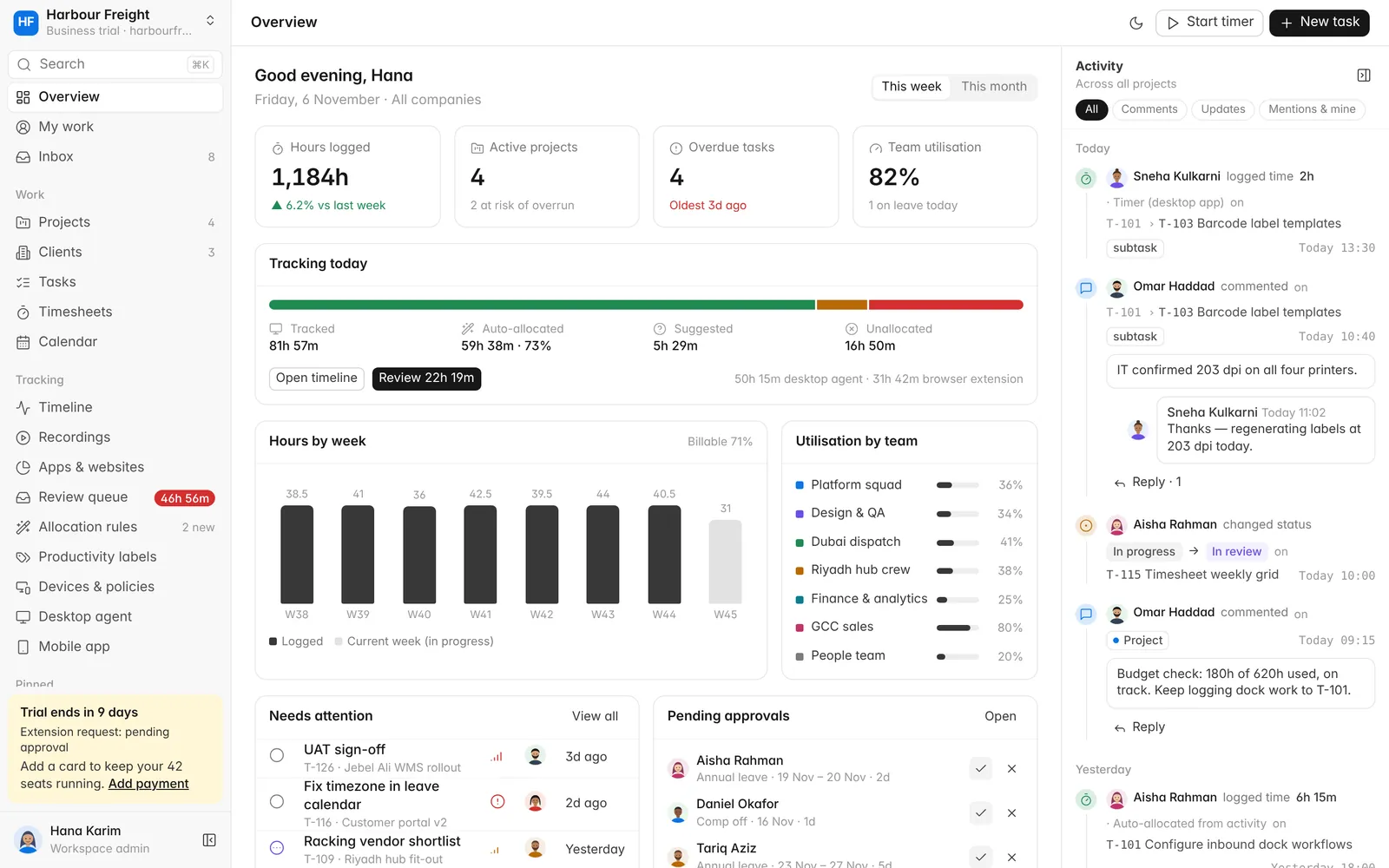
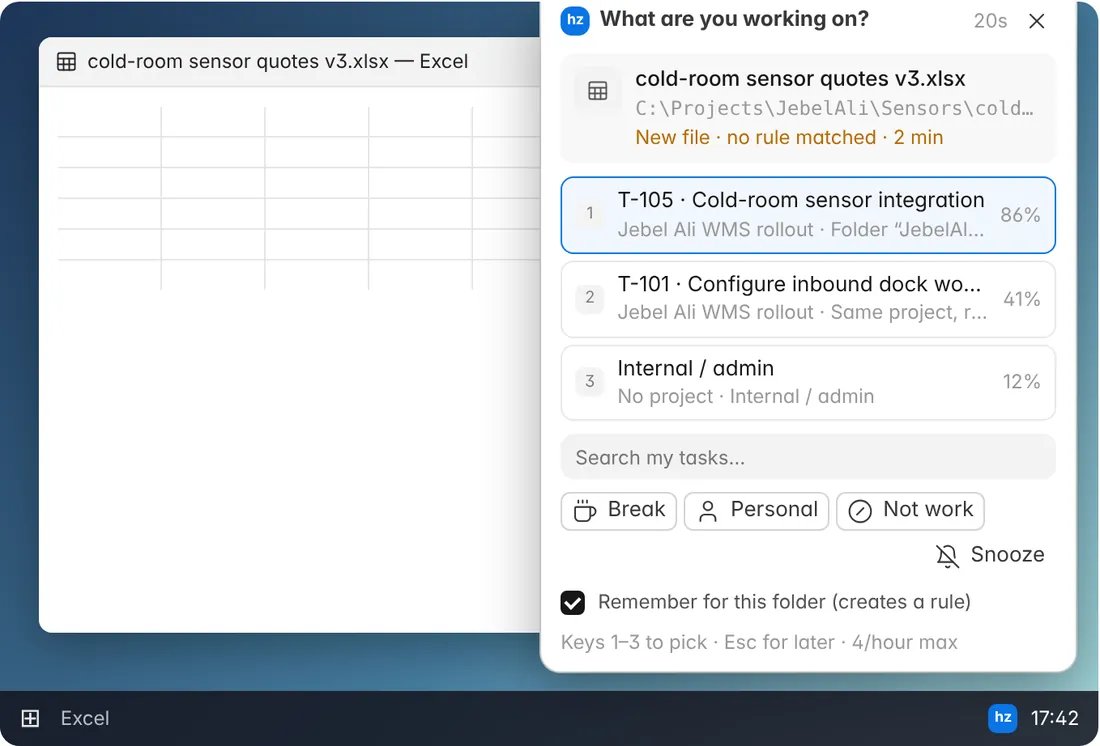
Rules allocate most of it. The desktop asks about the rest.
- Allocation rules“Files in \Sensors\ → T-105” or “jira.company.com/WMS-* → Jebel Ali rollout”. Managers approve new rules.
- “What are you working on?”A small pop-up after two minutes in an unknown app, with the top three task guesses. Keys 1–3 to answer.
- Review queueWhatever is still unallocated lands in one list for the end of the day.
Approvals that follow your org chart and your clients
- Manager, project lead, then clientClients approve their hours in a portal, with a sign-in log you can show them.
- Leaves, overtime and expenses in the same inboxOne queue per approver; nobody approves their own.
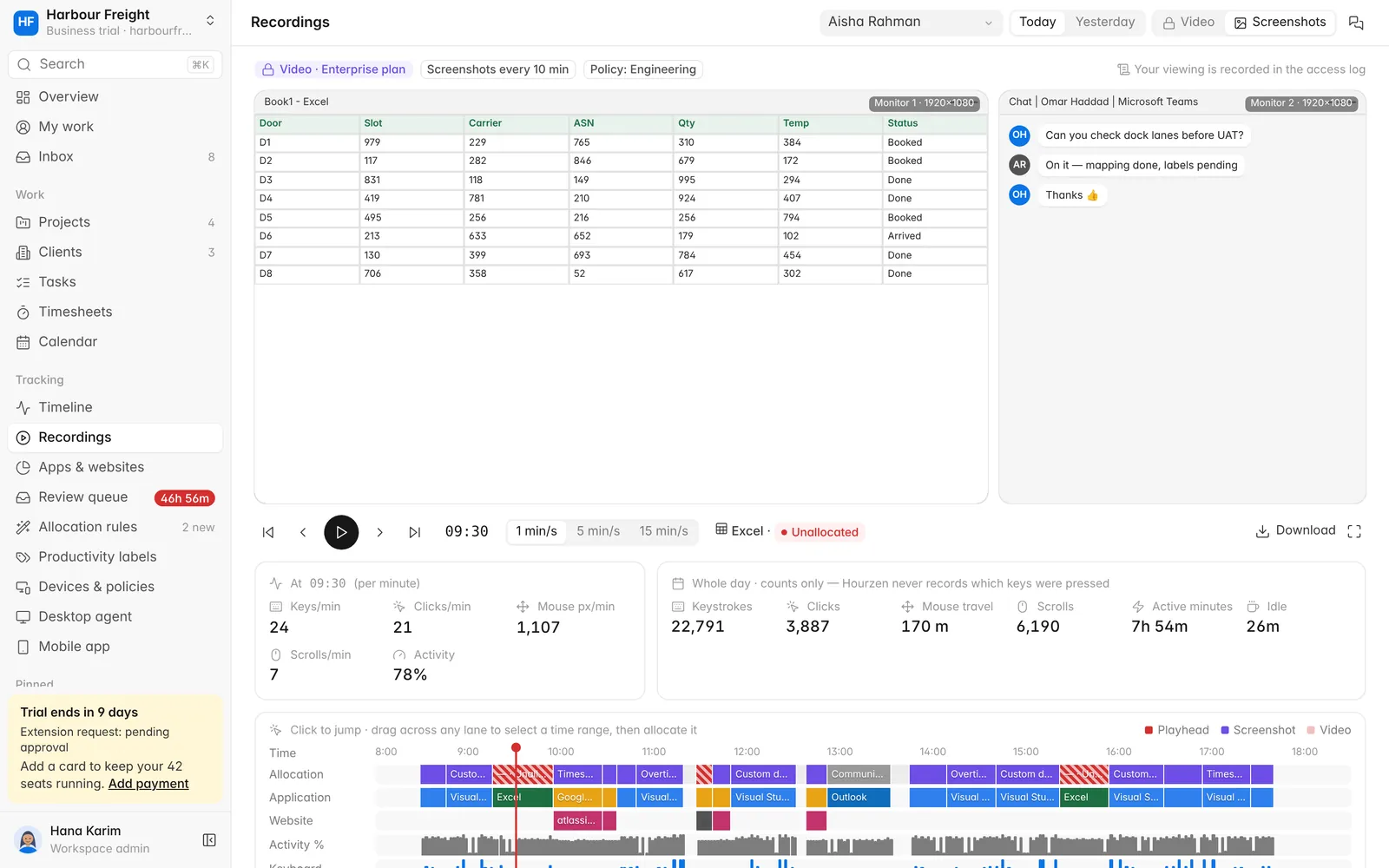
- Recordings with an access logEvery view of a recording is recorded and visible to the employee’s HR.
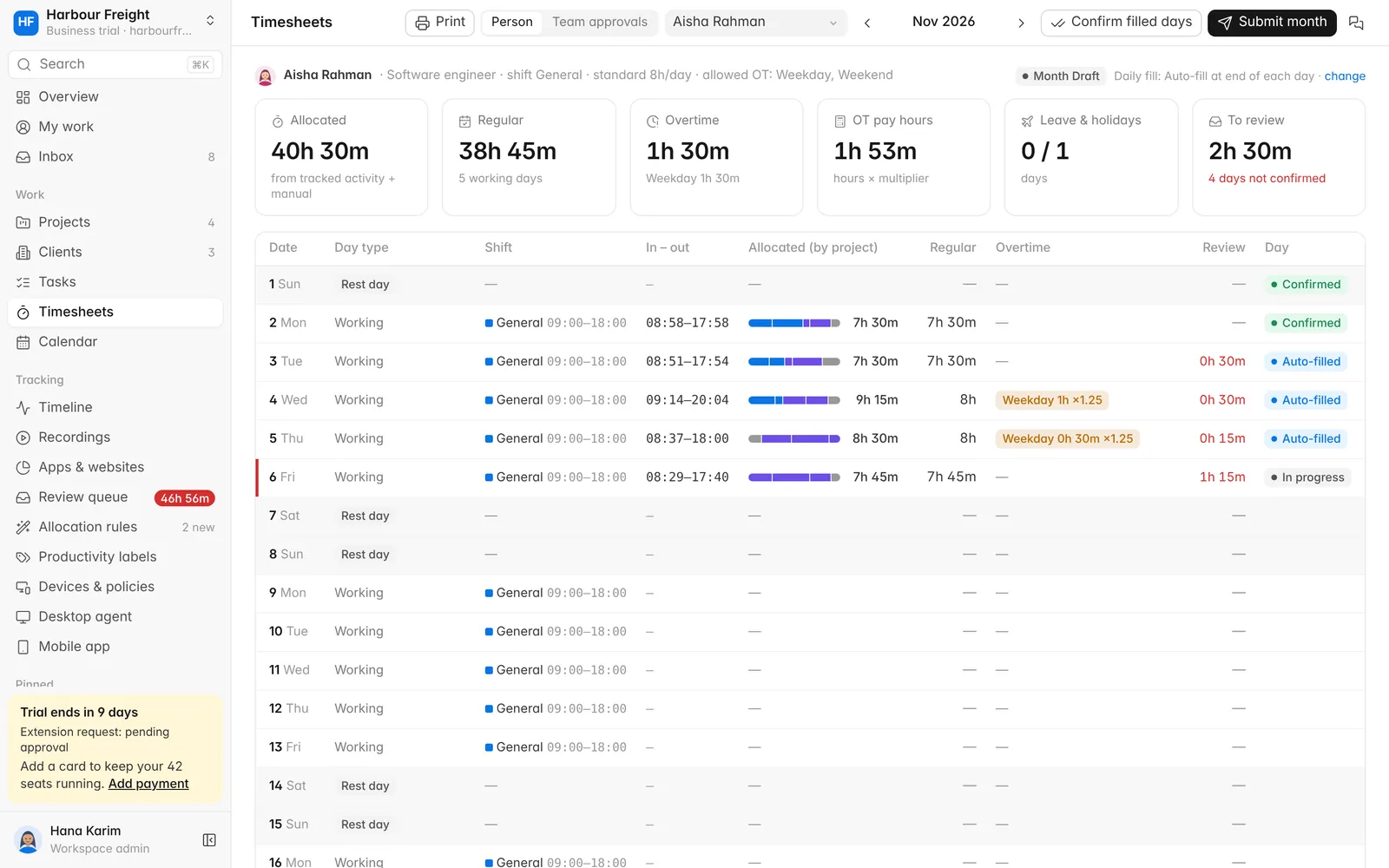
A monthly timesheet payroll can use as-is
- Overtime by countryUAE, KSA and India presets with your own rates, per employee if needed.
- Printable and signableYour letterhead and logo; employees print, sign and file it.
- ProfitabilityHours × cost against bill rates and expenses, per person and per project.
One record of time, read five ways
Know which client paid for every hour
- Profit per person and per project, from approved hours
- Approved weeks become client invoice drafts
- Pay per tracked person; approvers and clients are free
Overtime and leave that follow your country’s law
- A monthly timesheet payroll can use as-is
- Attendance, shifts, leave and holidays in one place
- Each overtime record shows how it was worked out
Approve the week instead of chasing it
- Most time arrives already on the right project
- Timesheets, leave, overtime and expenses in one inbox
- Workload per person and per project
Hours you can check, without the screenshots
- Approve hours in your own client portal
- Progress, updates and invoices in one place
- Never sees screenshots, recordings, activity data or internal comments
What is and isn’t recorded
Recorded
- The app, website and document in front of you, each kept separately
- Active time, idle time and breaks
- How many keys and clicks per minute, as counts only
- Screenshots, only if your company turns them on, with blur
Never recorded
- Which keys you press or what you type
- Your webcam or microphone
- Apps and sites on your company’s ignore list
- Your screen, when screenshots are off
Made for firms that bill or cost by the hour
Logistics and freight
Agencies and studios
BPO and back office
Engineering and IT consultancies
Weekends, Ramadan and overtime, the way your country sets them
Free overtime calculator
Host it in the country you choose
From sign-up to tracking in one afternoon
Sign up
Pick region and rules
We build your site
Agent and domain
Per tracked person, per month
Starter
- Automatic capture: apps, websites, documents
- Allocation rules and review queue
- Projects, tasks, subtasks, Gantt
- Timesheets with approvals
- Arabic and English
Business Recommended
- Everything in Starter
- Screenshots with blur and access log
- Attendance, shifts, leave, holidays
- Overtime by Gulf law, expenses
- Client portal and invoice drafts
- Profitability per person and project
- Custom domain, Microsoft and Google sign-in
Enterprise
- Everything in Business
- Screen video (add-on, metered)
- User provisioning, audit export
- Support sign-in you approve, SLA
- Longer media retention options
- Named onboarding manager
How Hourzen compares
| Feature | Hourzen | Hubstaff | Time Doctor | Timely | Bayzat |
|---|---|---|---|---|---|
| Best known for | Time captured, approved and billed | Screenshots, payroll and GPS for remote teams | BPO and outsourcing teams | Automatic timesheets without screenshots | UAE payroll, WPS and HR |
| Captures apps and websites | Yes | Yes | Yes | Yes | No |
| How time reaches a project | Rules you can read, plus a desktop prompt | Timer per project | Timer per task | AI suggestions | Typed timesheets |
| Screenshots | On Business, with blur | Yes | Yes | No, by design | No |
| Log of who viewed each screenshot | Yes | Not advertised | Not advertised | — | — |
| Arabic interface | Yes | No | No | No | Yes |
| Gulf hosting region | UAE or Saudi Arabia (Jeddah) | Not listed | Not listed | Not listed | Not checked |
| Price per person per month, billed yearly | $9–29 | $4.99–25 | $6.67–16.70 | $9–22 | $5–8 (third-party estimate) |
Built so you can show auditors who saw what
Support sign-in you allow
Employee notice built in
Microsoft and Google sign-in
Audit log you can export
Before you sign up
What overtime does the law set?
Pick a country, enter a monthly basic salary and the hours worked. You get the legal minimum for each kind of overtime. Nothing you type leaves this page.
Count each hour once: put it under night if it falls in the night hours.
| Type | Hours | Rate | Amount |
|---|
Check with your adviser; rates as of Nov 2026. This is a guide to the legal minimum, not legal advice, and your contract can pay more.
Go to your Hourzen site
Type your workspace address. It’s in your welcome email.
New to Hourzen? Start a free trial
You can close this page. We’ll email you when your workspace is ready. Come back to this page on this device to see how it’s going.
Your site is ready
Put Hourzen on your own address
Add two records at your DNS provider: a TXT record proves the domain is yours, a CNAME sends traffic to your site. We check them, issue the certificate and switch it on.
| Type | Name / host | Value | Status |
|---|
Switch records on and off, then press Check now to see what Hourzen reports.
Cloudflare: DNS → Records → Add record; set the CNAME to “DNS only” (grey cloud).
GoDaddy: My Products → DNS → Add New Record.
Route 53: Hosted zones → your zone → Create record.
Etisalat / du business DNS: raise the two records with your account manager; send them this page’s values.